For work that outlasts one conversation
Stop bringing your AI up to speed.
Watch Phronesis unfold.
60 secondsA concept film about keeping the reasoning behind a decision, returning to it, and learning from the outcome. The checkout example and chart are illustrative, not live product footage or customer results.
Film text alternative
The film uses on-screen text and an original musical score. It opens with product decisions such as “Ship it,” “Cut it,” and “Not yet,” then asks what happens when the reasoning is forgotten between conversations.
Phronesis is introduced through five steps: catch, approve, recall, revisit, and compound. Source material is captured; you approve what becomes current; relevant decisions return when needed; you record an outcome; and lessons can become principles you take forward.
In the illustrative example, a note says that three customers could not complete checkout because of an address form. The approved decision is to fix checkout first, because people cannot complete a purchase. The decision returns during planning, then is reviewed later. Its lesson is to remove the blocker before adding a feature.
A diagram connects source material, current decisions, and shared principles through human approval. A conceptual chart contrasts starting over each session with retaining prior thinking. It represents the idea of accumulation, not measured performance.
A sample week shows meeting preparation, extracting decisions and commitments, drafting a product requirements document with sources, preparing a stakeholder update that you send, and recalling earlier conclusions. The closing message is: “You bring the moment. It brings the rest.” Your workspace is plain Markdown on your own disk.
Compound · illustrating the Phronesis advantage.
Keep decisions, reasons, and next steps in a record you and your tools can read and correct, ready when your next session starts.
Readable files on your own computer.
How you use it
Set it up once. Then work normally.
For work that outlasts one conversation: a project, a client, a launch, a long decision.
- 01InstallThe macOS app or the CLI. Either one creates your workspace, a folder of readable files.
- 02OpenThat folder in Claude Code, Codex, or Cursor.
- 03WorkOn a real task. Decisions and reasons worth keeping are proposed for your approval.
- 04ReviewRead and correct what was kept, in the optional macOS app or by asking your assistant.
A workspace you can see
Know where the work stands.
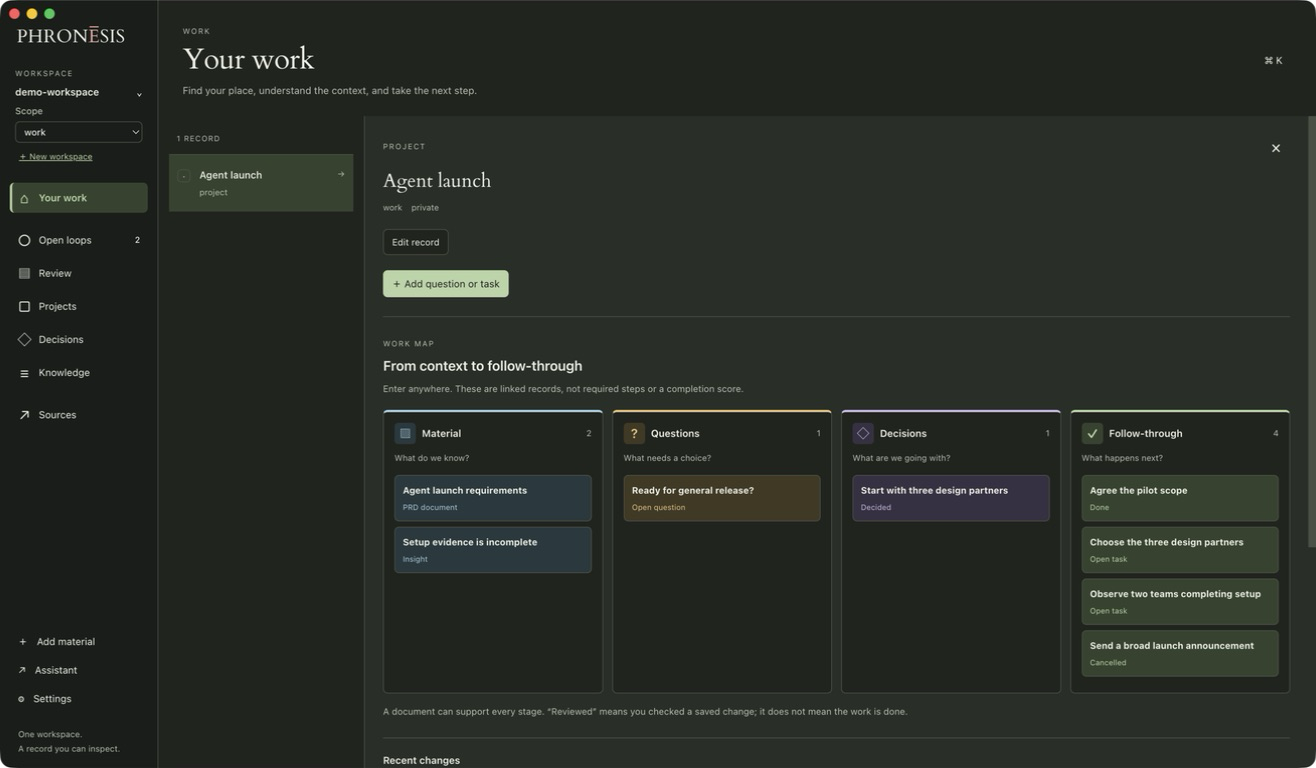
See the project, read what changed, and correct what needs correcting. Your source material stays close to the work.
View the macOS app screenshot · Agent launch demonstration workspace
Find your place
Bring the documents, decisions, and open work for a project into view.
Check the understanding
Read the source behind a record. Edit a mistake without losing the trail.
Keep going
Work here or return to your assistant. Both use the same local workspace.
Source → judgment → next move
Keep the decision, its reason, and its source.
Synthetic example · October 8 · Agent Management launch review
01 After the meeting
“Agent Management goes to three design partners on October 15. General release waits until two teams complete setup without live support. Maya will choose the partners by Friday.”
02 What Phronesis keeps
- Rollout
- Three design partners on October 15.
- Release gate
- Two teams complete setup without live support.
- Owner
- MayaNext actionChoose the partners by Friday.
03 When you come back
“Can we announce the general release?”
The saved decision says not until two teams complete setup without live support, after a design-partner rollout. The record does not show whether that has happened, so check it first. Maya owned the partner list, due that Friday.
Open the October 8 launch review
Keep the tools you know
Your assistant. Your files.
Phronesis works with Claude Code and Codex, with automatic hooks you review and enable. Cursor can read the same files; it has no native Phronesis recall or capture hooks. Keep using them to bring in material and work through it. The macOS app is an optional view into the same workspace.
Set up your workspace“What did we decide about the launch, and what’s still open?”
Decisions, source notes, and next steps remain in readable files, ready for the next conversation.
See what lives in the workspaceBuilt to stay yours
Keep what you build.
Your workspace is a folder of readable files. Open it in Obsidian, VS Code, or a text editor. Use another model or assistant. The work stays with you.
Check the evidence, revise a conclusion, and find the result there next time.
About the work
Built from the cost of starting cold.
I built Phronesis after an earlier product taught me the limits of retrieval. It could find old passages, but it couldn’t tell me where the work stood.
I wanted something I could read, correct, and find waiting in the next conversation.